Forecast Revisions with TimeDB
This notebook demonstrates how to work with overlapping forecast revisions in TimeDB.
What you’ll learn:
Creating overlapping forecasts - Multiple forecasts for the same series with different known_time
Reading all forecast revisions - Querying all versions of forecasts with a single query
Visualizing forecast revisions - Plotting overlapping forecasts to see how they evolve
Key Concepts:
known_time: When the forecast was made (batch_start_time)valid_time: The time period the forecast predictsOverlapping forecasts: Multiple forecasts made at different times predicting the same future periods
Series identification: Each series has a unique combination of name, unit, and labels
Part 1: Setup and Create Database Schema
[1]:
# Import timedb SDK
import timedb as td
# Import pandas for data manipulation and matplotlib for plotting
import pandas as pd
import numpy as np
from datetime import datetime, timedelta, timezone
import matplotlib.pyplot as plt
td.delete()
td.create()
Creating database schema...
✓ Schema created successfully
[2]:
# Create series for forecast and actual values
# Use different names to distinguish between forecast and actual
# get_or_create_series returns existing series if it already exists with same name/unit/labels
forecast_series_id = td.get_or_create_series(
name='forecast',
unit='MW',
labels={'type': 'power_forecast', 'model': 'sinus_with_error'},
description='Forecasted power values with overlapping revisions'
)
actual_series_id = td.get_or_create_series(
name='actual',
unit='MW',
labels={'type': 'power_actual'},
description='Actual power values (ground truth)'
)
print(f'✓ Got/created forecast series (series_id: {forecast_series_id})')
print(f' name="forecast", unit="MW", labels={{"type": "power_forecast", "model": "sinus_with_error"}}')
print(f'✓ Got/created actual series (series_id: {actual_series_id})')
print(f' name="actual", unit="MW", labels={{"type": "power_actual"}}')
✓ Got/created forecast series (series_id: a161b2fd-029d-49fa-ac45-55dbdc8d0b83)
name="forecast", unit="MW", labels={"type": "power_forecast", "model": "sinus_with_error"}
✓ Got/created actual series (series_id: feafad38-e0a8-43a5-84cf-79e2204180ff)
name="actual", unit="MW", labels={"type": "power_actual"}
Part 2: Create 4 Forecasts with Shifting Valid Times
We’ll create 4 forecasts in a loop, where each forecast’s valid_time range starts at its known_time. The batch_start_time will default to the current time when the script runs. All forecasts:
Use the same series_id (with name=’forecast’, unit=’MW’, labels={‘type’: ‘power_forecast’, ‘model’: ‘sinus_with_error’})
Have a 3-day horizon with hourly resolution (72 hours)
Have
known_timeset 1 day apartEach forecast’s
valid_timestarts at itsknown_time, so later forecasts are shifted forward in time
[3]:
# Base time for first forecast
base_valid_time = datetime(2025, 1, 1, 0, 0, tzinfo=timezone.utc)
# Forecast horizon: 3 days with hourly resolution
forecast_horizon_hours = 72
# Number of forecasts to create
num_forecasts = 4
# Store forecast metadata
forecast_metadata = []
print(f"Creating {num_forecasts} forecasts...")
print(f"Forecast horizon: {forecast_horizon_hours} hours (3 days)")
print(f"Each forecast's valid_time starts at its known_time")
print()
series_ids_map = None
for i in range(num_forecasts):
# Each forecast's known_time is 1 day apart, starting from base_valid_time
known_time = base_valid_time + timedelta(days=i)
# Each forecast's valid_time range starts at its known_time
# Generate valid_time range (3 days, hourly) starting from known_time
valid_times = [known_time + timedelta(hours=j) for j in range(forecast_horizon_hours)]
# Generate forecast values: sinus function base + random walk error
# This makes forecasts look realistic - following a pattern with small forecast errors
# Base sinus function parameters
base_power = 100.0 # Mean power level
amplitude = 30.0 # Amplitude of sinus function (daily pattern)
period_hours = 24 # Period of sinus (24 hours for daily pattern)
# Generate sinus function for the base pattern
# Use hours from start of valid_time range as x-axis
hours_from_start = np.arange(forecast_horizon_hours)
sinus_base = base_power + amplitude * np.sin(2 * np.pi * hours_from_start / period_hours)
# Add random walk error - small relative to sinus amplitude
# Error represents forecast uncertainty that accumulates over time
np.random.seed(42 + i) # Different seed for each forecast for reproducibility
error_std = amplitude * 0.03 # Error std is 1% of sinus amplitude (small relative to pattern)
error_steps = np.random.normal(0, error_std, forecast_horizon_hours)
error_walk = np.cumsum(error_steps)
# Combine sinus base with error walk
forecast_values = sinus_base + error_walk
forecast_values = np.round(forecast_values, 2).tolist()
# Create DataFrame (column name 'forecast' matches series name)
df_forecast = pd.DataFrame({
"valid_time": valid_times,
"forecast": forecast_values
})
# Insert forecast - batch_start_time defaults to current time
# known_time is the start of this forecast's valid_time range
if i == 0:
# First forecast: use explicit series_id
result = td.insert_batch(
df=df_forecast,
known_time=known_time,
series_ids={"forecast": forecast_series_id}
)
series_ids_map = result.series_ids
else:
# Subsequent forecasts: reuse the same series_id
result = td.insert_batch(
df=df_forecast,
known_time=known_time,
series_ids=series_ids_map
)
series_ids_map = result.series_ids
forecast_metadata.append({
"forecast_num": i + 1,
"known_time": known_time,
"valid_time_start": valid_times[0],
"valid_time_end": valid_times[-1],
"batch_id": result.batch_id,
"series_id": forecast_series_id
})
print(f"✓ Forecast {i+1}/{num_forecasts} created")
print(f" known_time: {known_time}")
print(f" valid_time range: {valid_times[0]} to {valid_times[-1]}")
print(f" Batch ID: {result.batch_id}")
print()
print(f"✓ All {num_forecasts} forecasts created successfully!")
print(f"Each forecast uses the same series_id: {forecast_series_id}")
print(f"Series metadata: name='forecast', unit='MW', labels={{'type': 'power_forecast', 'model': 'sinus_with_error'}}")
# Now insert the true sinus function as "actual" (flat time series without revisions)
print("\n" + "=" * 60)
print("Inserting actual values (true sinus function)...")
print("=" * 60)
# Calculate the overall valid_time range covering all forecasts
# We'll insert actual values for the entire range
start_valid = base_valid_time
end_valid = base_valid_time + timedelta(days=num_forecasts - 1) + timedelta(hours=forecast_horizon_hours)
# Generate all valid_times for the actual series
actual_valid_times = []
current_time = start_valid
while current_time < end_valid:
actual_valid_times.append(current_time)
current_time += timedelta(hours=1)
# Generate actual values using the true sinus function (no error)
base_power = 100.0
amplitude = 30.0
period_hours = 24
hours_from_start = np.arange(len(actual_valid_times))
actual_values = base_power + amplitude * np.sin(2 * np.pi * hours_from_start / period_hours)
actual_values = np.round(actual_values, 2).tolist()
# Create DataFrame for actual values (column name 'actual' matches series name)
df_actual = pd.DataFrame({
"valid_time": actual_valid_times,
"actual": actual_values
})
# Insert actual values with known_time set to the last valid_time
# This represents when the actual values become known (after all data is collected)
actual_known_time = actual_valid_times[-1]
result_actual = td.insert_batch(
df=df_actual,
known_time=actual_known_time,
series_ids={"actual": actual_series_id}
)
print(f"✓ Actual values inserted successfully!")
print(f" Series ID: {actual_series_id}")
print(f" Valid time range: {actual_valid_times[0]} to {actual_valid_times[-1]}")
print(f" Number of data points: {len(actual_valid_times)}")
print(f" Batch ID: {result_actual.batch_id}")
print(f"\nForecast series: name='forecast', unit='MW', labels={{'type': 'power_forecast', 'model': 'sinus_with_error'}}")
print(f"Actual series: name='actual', unit='MW', labels={{'type': 'power_actual'}}")
print(f"Each forecast's valid_time starts at its known_time, shifted forward by 1 day for each subsequent forecast")
Creating 4 forecasts...
Forecast horizon: 72 hours (3 days)
Each forecast's valid_time starts at its known_time
Data values inserted successfully.
✓ Forecast 1/4 created
known_time: 2025-01-01 00:00:00+00:00
valid_time range: 2025-01-01 00:00:00+00:00 to 2025-01-03 23:00:00+00:00
Batch ID: 5f89e0a7-2c19-4d6a-832c-b26483697419
Data values inserted successfully.
✓ Forecast 2/4 created
known_time: 2025-01-02 00:00:00+00:00
valid_time range: 2025-01-02 00:00:00+00:00 to 2025-01-04 23:00:00+00:00
Batch ID: ffe5a911-bed5-4728-bfcd-e87a2534b9fe
Data values inserted successfully.
✓ Forecast 3/4 created
known_time: 2025-01-03 00:00:00+00:00
valid_time range: 2025-01-03 00:00:00+00:00 to 2025-01-05 23:00:00+00:00
Batch ID: 6c28f629-2601-41ec-9548-b48e6d053869
Data values inserted successfully.
✓ Forecast 4/4 created
known_time: 2025-01-04 00:00:00+00:00
valid_time range: 2025-01-04 00:00:00+00:00 to 2025-01-06 23:00:00+00:00
Batch ID: cc292874-cf7b-4ce2-9f15-05522ae42052
✓ All 4 forecasts created successfully!
Each forecast uses the same series_id: a161b2fd-029d-49fa-ac45-55dbdc8d0b83
Series metadata: name='forecast', unit='MW', labels={'type': 'power_forecast', 'model': 'sinus_with_error'}
============================================================
Inserting actual values (true sinus function)...
============================================================
Data values inserted successfully.
✓ Actual values inserted successfully!
Series ID: feafad38-e0a8-43a5-84cf-79e2204180ff
Valid time range: 2025-01-01 00:00:00+00:00 to 2025-01-06 23:00:00+00:00
Number of data points: 144
Batch ID: 01d5c25c-eb59-44ff-b12a-8d04265c52a8
Forecast series: name='forecast', unit='MW', labels={'type': 'power_forecast', 'model': 'sinus_with_error'}
Actual series: name='actual', unit='MW', labels={'type': 'power_actual'}
Each forecast's valid_time starts at its known_time, shifted forward by 1 day for each subsequent forecast
Part 3: Read All Forecast Revisions
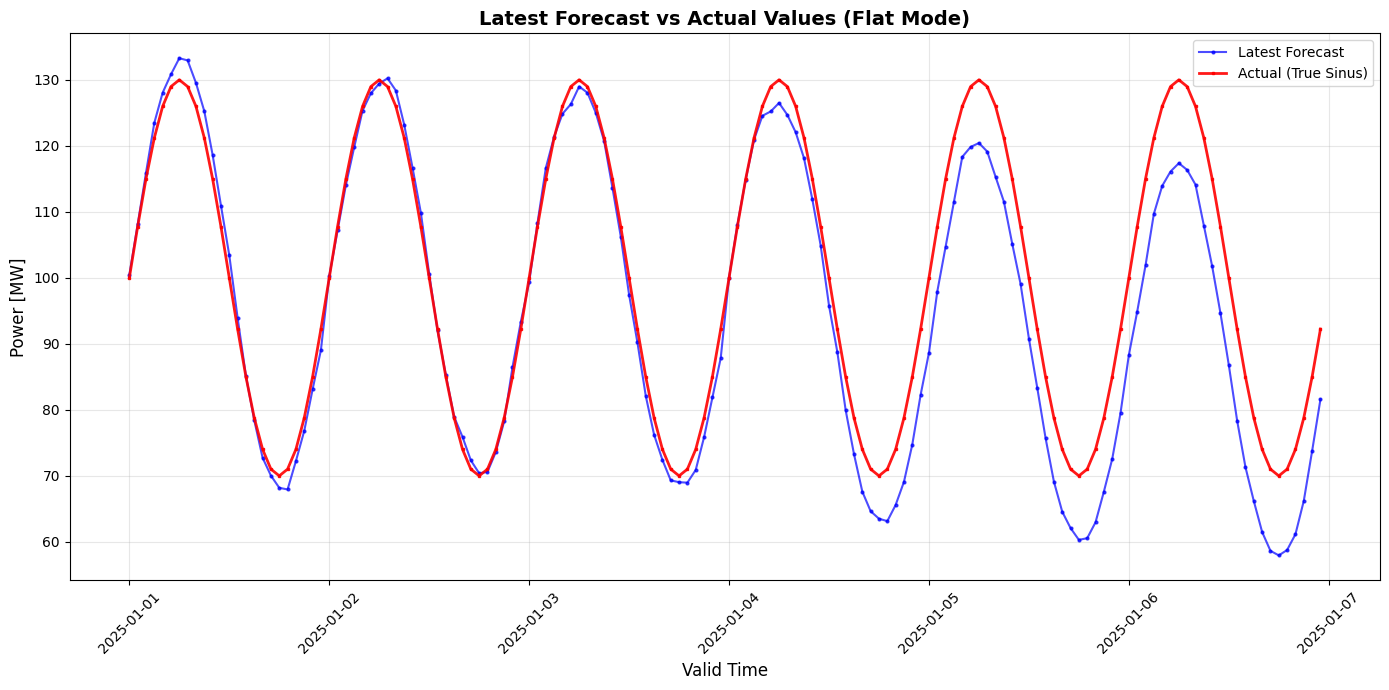
Now we’ll read back all forecast revisions using td.read_values_flat(). This returns the latest forecast for each valid_time (most recent based on known_time) in a single query.
[4]:
# Read latest forecast values (flat mode)
# This returns the most recent forecast for each valid_time based on known_time
# Calculate the overall valid_time range covering all forecasts
# First forecast starts at base_valid_time, last forecast ends at base_valid_time + (num_forecasts-1) days + forecast_horizon_hours
start_valid = base_valid_time
end_valid = base_valid_time + timedelta(days=num_forecasts - 1) + timedelta(hours=forecast_horizon_hours)
df_flat = td.read_values_flat(
start_valid=start_valid,
end_valid=end_valid
)
print(f"✓ Read {len(df_flat)} data points")
print(f"DataFrame shape: {df_flat.shape}")
print(f"Index: {df_flat.index.name}")
print(f"Columns: {list(df_flat.columns)}")
print(f"\nThis shows the latest forecast values for each valid_time.")
print(f"\nFirst few rows:")
df_flat.head(10)
✓ Read 144 data points
DataFrame shape: (144, 2)
Index: valid_time
Columns: ['forecast', 'actual']
This shows the latest forecast values for each valid_time.
First few rows:
[4]:
| name | forecast | actual |
|---|---|---|
| valid_time | ||
| 2025-01-01 00:00:00+00:00 | 100.45 | 100.00 |
| 2025-01-01 01:00:00+00:00 | 108.09 | 107.76 |
| 2025-01-01 02:00:00+00:00 | 115.91 | 115.00 |
| 2025-01-01 03:00:00+00:00 | 123.49 | 121.21 |
| 2025-01-01 04:00:00+00:00 | 128.05 | 125.98 |
| 2025-01-01 05:00:00+00:00 | 130.83 | 128.98 |
| 2025-01-01 06:00:00+00:00 | 133.28 | 130.00 |
| 2025-01-01 07:00:00+00:00 | 132.94 | 128.98 |
| 2025-01-01 08:00:00+00:00 | 129.53 | 125.98 |
| 2025-01-01 09:00:00+00:00 | 125.25 | 121.21 |
[5]:
# Plot the latest forecast and actual values (flat mode)
plt.figure(figsize=(14, 7))
# Plot forecast and actual
plt.plot(df_flat.index, df_flat['forecast'], marker='o', markersize=2, linewidth=1.5,
label='Latest Forecast', alpha=0.7, color='blue')
plt.plot(df_flat.index, df_flat['actual'], marker='s', markersize=2, linewidth=2,
label='Actual (True Sinus)', alpha=0.9, color='red')
plt.xlabel('Valid Time', fontsize=12)
plt.ylabel('Power [MW]', fontsize=12)
plt.title('Latest Forecast vs Actual Values (Flat Mode)', fontsize=14, fontweight='bold')
plt.grid(True, alpha=0.3)
plt.legend()
plt.xticks(rotation=45)
plt.tight_layout()
plt.show()
print("✓ Latest forecast and actual values plotted successfully!")
✓ Latest forecast and actual values plotted successfully!
Part 4: Read All Forecast Revisions (Overlapping Mode)
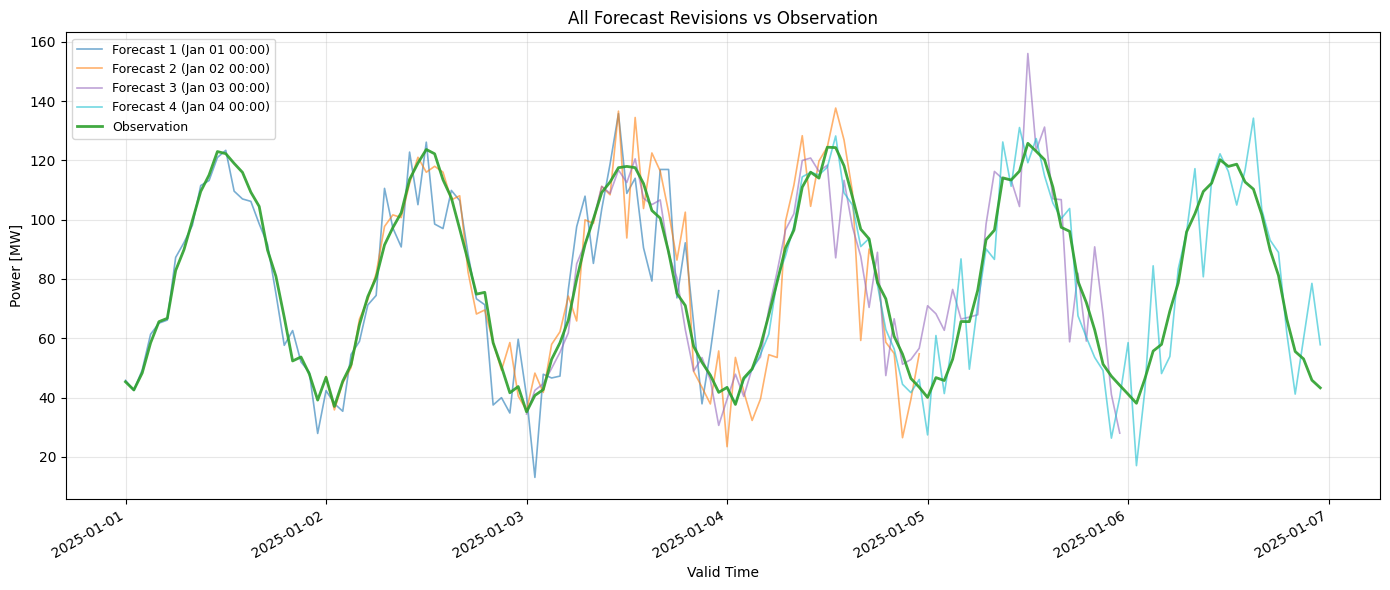
Now let’s read all forecast revisions using td.read_values_overlapping(). This returns all forecasts with both known_time and valid_time, showing how forecasts evolve over time. This is useful for analyzing forecast revisions and backtesting.
[6]:
# Read all forecast revisions (overlapping mode)
print("Reading all forecast revisions (overlapping mode)...")
print("=" * 60)
# Calculate the overall valid_time range covering all forecasts
# First forecast starts at base_valid_time, last forecast ends at base_valid_time + (num_forecasts-1) days + forecast_horizon_hours
start_valid = base_valid_time
end_valid = base_valid_time + timedelta(days=num_forecasts - 1) + timedelta(hours=forecast_horizon_hours)
df_overlapping = td.read_values_overlapping(
start_valid=start_valid,
end_valid=end_valid
)
print(f"✓ Read {len(df_overlapping)} data points")
print(f"\nDataFrame shape: {df_overlapping.shape}")
print(f"\nIndex levels: {df_overlapping.index.names}")
print(f"\nColumns: {list(df_overlapping.columns)}")
print(f"\nThis shows all forecast revisions, including all known_time values.")
print(f"\nFirst few rows:")
df_overlapping.head(10)
Reading all forecast revisions (overlapping mode)...
============================================================
✓ Read 432 data points
DataFrame shape: (432, 2)
Index levels: ['known_time', 'valid_time']
Columns: ['forecast', 'actual']
This shows all forecast revisions, including all known_time values.
First few rows:
[6]:
| name | forecast | actual | |
|---|---|---|---|
| known_time | valid_time | ||
| 2025-01-01 00:00:00+00:00 | 2025-01-01 00:00:00+00:00 | 100.45 | NaN |
| 2025-01-01 01:00:00+00:00 | 108.09 | NaN | |
| 2025-01-01 02:00:00+00:00 | 115.91 | NaN | |
| 2025-01-01 03:00:00+00:00 | 123.49 | NaN | |
| 2025-01-01 04:00:00+00:00 | 128.05 | NaN | |
| 2025-01-01 05:00:00+00:00 | 130.83 | NaN | |
| 2025-01-01 06:00:00+00:00 | 133.28 | NaN | |
| 2025-01-01 07:00:00+00:00 | 132.94 | NaN | |
| 2025-01-01 08:00:00+00:00 | 129.53 | NaN | |
| 2025-01-01 09:00:00+00:00 | 125.25 | NaN |
[7]:
# Plot all overlapping forecasts and actual values
plt.figure(figsize=(16, 9))
# Separate forecast and actual data
df_forecast_overlapping = df_overlapping[['forecast']].dropna()
df_actual_overlapping = df_overlapping[['actual']].dropna()
# Get unique known_times from the forecast series only (exclude actual's known_time)
# Each known_time in the forecast series represents a different forecast revision
unique_known_times = df_forecast_overlapping.index.get_level_values("known_time").unique()
unique_known_times = sorted(unique_known_times)
print(f"Plotting {len(unique_known_times)} forecast revisions...")
# Plot each forecast revision with dashed blue lines
for idx, known_time in enumerate(unique_known_times):
# Get all values for this known_time
forecast_data = df_forecast_overlapping.xs(known_time, level="known_time")
# Extract valid_time and values
valid_times_plot = forecast_data.index
values = forecast_data['forecast'].values
# Plot this forecast revision with dashed blue line
label = f"Forecast {idx+1} (known_time: {known_time.strftime('%Y-%m-%d %H:%M')})"
plt.plot(valid_times_plot, values, linewidth=1.5, linestyle='--',
label=label, color='blue', alpha=0.5)
# Plot the latest forecast from flat data (read_values_flat) with solid blue line
plt.plot(df_flat.index, df_flat['forecast'], linewidth=2, linestyle='-',
label='Latest Forecast (flat)', color='blue', alpha=0.9, zorder=5)
# Plot actual values
# Actual values will have the same known_time (when they were inserted)
# Get unique valid_times and actual values (they should be the same across known_times)
actual_data = df_actual_overlapping.reset_index()
# Group by valid_time and take the first value (they should all be the same)
actual_data = actual_data.groupby('valid_time')['actual'].first().sort_index()
plt.plot(actual_data.index, actual_data.values,
linewidth=2.5, label='Actual (True Sinus)', alpha=0.9, color='red', zorder=10)
# Formatting
plt.xlabel('Valid Time (forecasted period)', fontsize=12)
plt.ylabel('Power [MW]', fontsize=12)
plt.title('All Overlapping Forecast Revisions vs Actual Values', fontsize=14, fontweight='bold')
plt.grid(True, alpha=0.3)
plt.legend(bbox_to_anchor=(1.05, 1), loc='upper left', fontsize=9)
plt.xticks(rotation=45)
plt.tight_layout()
plt.show()
print("✓ All forecast revisions and actual values plotted successfully!")
Plotting 4 forecast revisions...
✓ All forecast revisions and actual values plotted successfully!
[8]:
# The DataFrame from read_values_overlapping already has the correct structure:
# - Index: (known_time, valid_time) - double index
# - Columns: series_key (in this case "power")
# No reshaping needed!
df_forecast_revisions = df_overlapping
print(f"✓ DataFrame with (known_time, valid_time) index and '{list(df_forecast_revisions.columns)[0]}' column")
print(f"\nDataFrame shape: {df_forecast_revisions.shape}")
print(f"\nIndex levels: {df_forecast_revisions.index.names}")
print(f"\nColumn: {list(df_forecast_revisions.columns)}")
print(f"\nFirst few rows:")
df_forecast_revisions.head(15)
✓ DataFrame with (known_time, valid_time) index and 'forecast' column
DataFrame shape: (432, 2)
Index levels: ['known_time', 'valid_time']
Column: ['forecast', 'actual']
First few rows:
[8]:
| name | forecast | actual | |
|---|---|---|---|
| known_time | valid_time | ||
| 2025-01-01 00:00:00+00:00 | 2025-01-01 00:00:00+00:00 | 100.45 | NaN |
| 2025-01-01 01:00:00+00:00 | 108.09 | NaN | |
| 2025-01-01 02:00:00+00:00 | 115.91 | NaN | |
| 2025-01-01 03:00:00+00:00 | 123.49 | NaN | |
| 2025-01-01 04:00:00+00:00 | 128.05 | NaN | |
| 2025-01-01 05:00:00+00:00 | 130.83 | NaN | |
| 2025-01-01 06:00:00+00:00 | 133.28 | NaN | |
| 2025-01-01 07:00:00+00:00 | 132.94 | NaN | |
| 2025-01-01 08:00:00+00:00 | 129.53 | NaN | |
| 2025-01-01 09:00:00+00:00 | 125.25 | NaN | |
| 2025-01-01 10:00:00+00:00 | 118.62 | NaN | |
| 2025-01-01 11:00:00+00:00 | 110.96 | NaN | |
| 2025-01-01 12:00:00+00:00 | 103.41 | NaN | |
| 2025-01-01 13:00:00+00:00 | 93.93 | NaN | |
| 2025-01-01 14:00:00+00:00 | 85.14 | NaN |
Summary
This notebook demonstrated:
Creating overlapping forecasts: Multiple forecasts for the same series with different
known_timevaluesUsing explicit series creation: Created separate series for forecasts and actuals with descriptive names and labels
Reading latest values: Using
td.read_values_flat()to get the most recent forecast for each valid_timeReading all revisions: Using
td.read_values_overlapping()to get all forecast versions
Key Takeaways:
known_timerepresents when the forecast was made (batch_start_time)valid_timerepresents the time period being forecastedread_values_flat()returns the latest forecast values (one per valid_time) with series names as columnsread_values_overlapping()returns all forecast revisions with index(known_time, valid_time)and series names as columnsSeries are distinguished by their name, unit, and labels - use descriptive names for clarity
Overlapping forecasts allow you to track how predictions change as new information becomes available